Your search data,
kept.
Self-hosted SEO & GEO analytics in your own Cloudflare account. See what AI crawls, cites and clicks, keep your history forever, and ask it over MCP.
Built on data you already own
- Google Search Console
- Bing Webmaster Tools
- Cloudflare AI crawlers
- Cloudflare Web Analytics
- Claude
- Cursor
- ChatGPT
Crawled. Cited. Clicked.
Per page: fetched by GPTBot, ClaudeBot and PerplexityBot, cited in AI answers, clicked from ChatGPT, Perplexity and Copilot.
Crawled
412 pagesCloudflare AI crawlersCited
96 pages 23%Bing AI PerformanceClicked
38 pages 40%Web Analytics · GSC · Bing
Figures are illustrative. Cited comes from Bing AI Performance, imported as CSV.
AI reads it, then ignores it.
316 pages stall hereYou’re the source, not the destination.
58 pages stall hereAsk, don’t dig.
Twelve read-only MCP tools answer from your own data, so your assistant does the digging.
https://your-domain/mcpClaude · Claude Code · Cursor · ChatGPT
query_performancecompare_periods
find_quick_winsfind_cannibalizationfind_ctr_anomaliesfind_content_decay
geo_funnelai_crawlers
inspect_urllist_sitemapssubmit_sitemapwrite · off
list_sitessetup_status
Called in the chat
Tool referenceOr just look.
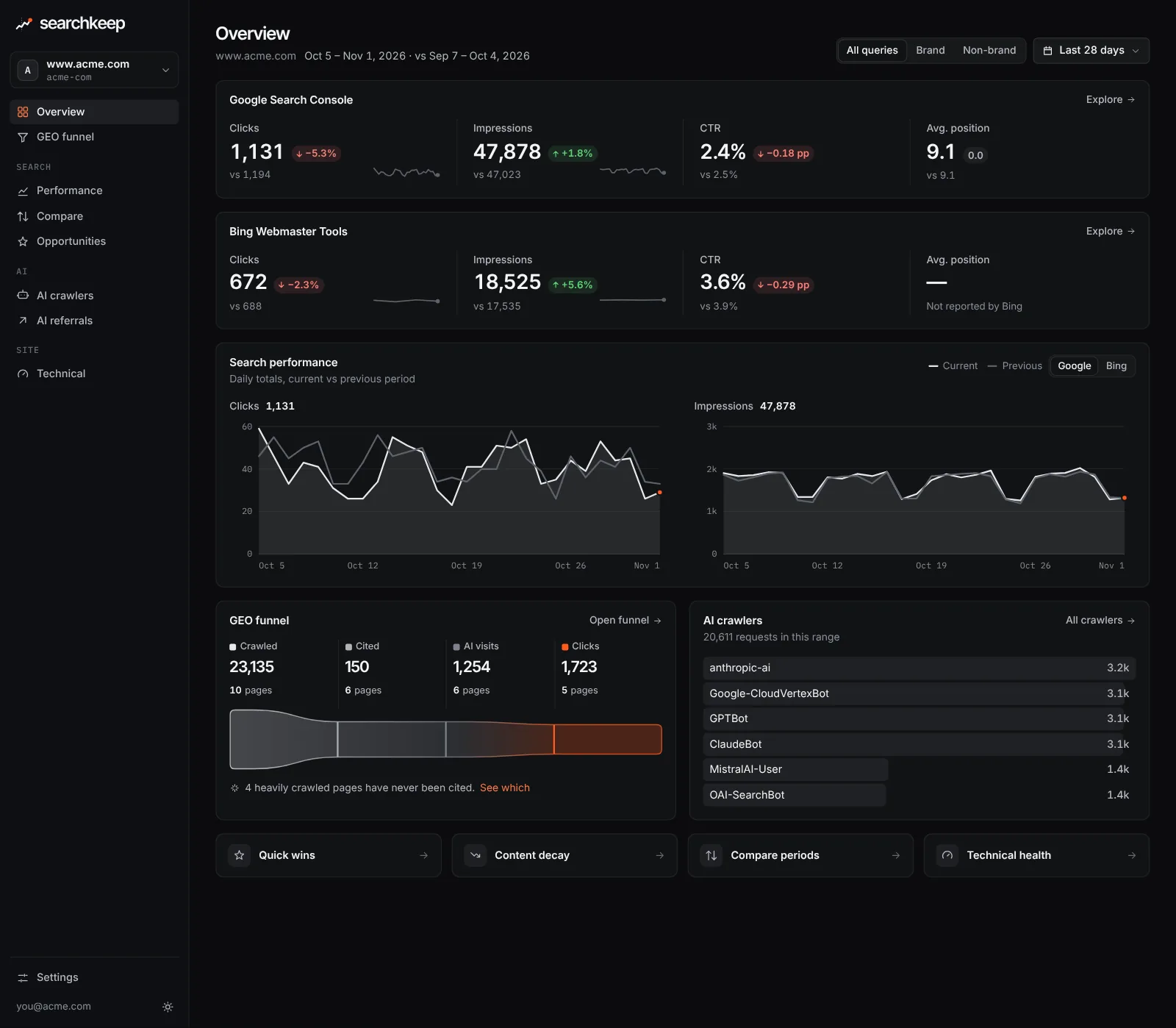
A fast dashboard on the same Worker, running the same analysis as the MCP tools.
- Overview
- GEO funnel
- AI crawlers & referrals
- Performance & compare
- Opportunities
- Technical
Keep your history forever.
Search Console keeps 16 months. Searchkeep backfills them, then keeps every day in D1.
- Search Console
- 16 months
- Searchkeep, two years in
- 40 months, and counting
First-party data only.
The Google Search Console, Bing Webmaster Tools and Cloudflare APIs you already have, synced into a D1 database you own.
-
Google Search Console
- Search Analytics
- Sitemaps
- URL Inspection
-
Bing Webmaster Tools
- Search traffic
- Crawl issues
- AI citations (CSV)
-
Cloudflare
- AI crawler requests
- Web Analytics
- Core Web Vitals
D1
- Syncs every 15 min
- Kept forever
One Worker. Your account.
MCP, the dashboard and the sync share one Cloudflare Worker and one D1 database. No Searchkeep server.
-
Your data never leaves your account
-
Read-only by default
-
Free-tier friendly
-
Upgrade = Sync fork
Locked until it’s safe.
Cloudflare Access in front, its JWT checked on every request, and no data until the setup is secure.
-
A request
MCP client or browser -
Cloudflare Access
Sign-in · Managed OAuth for MCP -
JWT re-verified
On every request -
Setup checks
Locks again if one breaks -
Your data
Dashboard, MCP and sync
-
no_access -
oauth_disabled -
policy_too_broad -
ready - Nothing is served or synced until
ready.
Hand the runbook to your agent.
An idempotent deploy guide an agent with GitHub and Cloudflare MCP can follow, stopping when you must click.
Deploy Searchkeep to my Cloudflare account by following docs/deploy.md
in the GitHub repository noobnooc/searchkeep. Honest about what it isn’t.
Your own data for your own sites. For backlinks, competitor research or rank tracking, keep a SaaS tool.
| Capability | Searchkeep | Typical SaaS SEO tool |
|---|---|---|
| Where your data lives | Your Cloudflare account | The vendor’s servers |
| Price | Free, MIT licensed | Monthly subscription |
| History past GSC’s 16 months | Kept in D1, forever | Varies; often only while subscribed |
| AI crawled → cited → clicked, per page | Built in | Rare |
| Ask from Claude, Cursor, ChatGPT | 12 read-only MCP tools | Sometimes |
| Telemetry | None | Usually |
| Backlink index | No, by design | Yes |
| Competitor research | No, by design | Yes |
| Rank tracking (SERP scraping) | No, by design | Yes |
What is Searchkeep?
Searchkeep is open-source SEO and GEO (generative engine optimization) analytics that you deploy to your own Cloudflare account. It keeps syncing Google Search Console, Bing Webmaster Tools and Cloudflare data into a D1 database, then lets you explore it in a dashboard or ask about it from any MCP client such as Claude, Cursor or ChatGPT.
How much does it cost?
Searchkeep is free and MIT licensed. You pay only for the Cloudflare resources it uses: one Worker, one D1 database and a cron trigger, which fit within Cloudflare’s free plans for typical sites. The history backfill is paced to stay under D1’s free limit of 100,000 rows written per day. Cloudflare Access is part of Zero Trust, which has a free plan for small teams.
Does my data leave my Cloudflare account?
No. Searchkeep has no backend of its own and sends no telemetry. Data flows from Google, Bing and Cloudflare APIs into your D1 database and is served only to you, through Cloudflare Access. When you ask a question over MCP, the tool results go to the AI client you chose to connect, just like any other MCP server.
What is the GEO funnel?
It follows each page through three steps of AI visibility: Crawled (AI crawlers fetched it, from Cloudflare), Cited (an AI answer referenced it, from the Bing AI Performance report, which has no API yet, so you import its CSV export from the dashboard) and Clicked (people arrived from an AI assistant, from Web Analytics referrers, alongside classic GSC and Bing clicks). Gaps between steps tell you what to fix.
How far back does the history go?
After you deploy, Searchkeep backfills as much as Google provides, which is 16 months, one day at a time. On the free D1 write quota the full backfill takes days to weeks. It never deletes anything, so your history keeps growing past the point where Search Console forgets it. The earlier you deploy, the more you keep.
Why no backlinks, competitor data or rank tracking?
By design. Searchkeep only uses first-party data you already have access to for sites you own. Backlink indexes and rank trackers depend on large-scale crawling or SERP scraping, which needs a vendor and is outside the project’s charter. Pair Searchkeep with a dedicated tool if you need them.
Do I need a paid Cloudflare plan?
No. AI crawler data requires the site to be proxied through Cloudflare (orange-clouded), which works on the free plan; Searchkeep identifies crawlers by user agent. AI referrals come from Web Analytics referrer hosts. Workers Free allows 10 ms of CPU per invocation, so the sync works in small batches; if sync units keep getting skipped, lower GSC_ROWS_PER_DAY or move to Workers Paid.
Can an AI agent deploy it for me?
Yes. The deploy guide is written as an idempotent runbook with a verification for every step. An agent with GitHub and Cloudflare MCP access can fork the repo, create the Worker, configure Access and set Secrets. A few steps need a human: authorizing the Cloudflare GitHub App, creating the Zero Trust organization, adding the service account in Search Console, generating the Bing API key and signing in through Access.
Which AI clients can connect?
Any MCP client that supports Streamable HTTP with OAuth, including Claude, Claude Code, Cursor and ChatGPT. Cloudflare Access acts as the OAuth server with dynamic client registration and PKCE, so there is no client ID to paste: the client opens a browser, you sign in, and it is connected.
How do I upgrade?
Open your fork on GitHub and click “Sync fork”. Workers Builds notices the new commit, builds and deploys, and the Worker applies any new D1 migrations itself on its next request. Your configuration lives in Worker Secrets, never in the repo, so upstream changes do not conflict with it.
Start keeping your search data today.
Deploys in 30–45 minutes.