Introduction
What Searchkeep is, how it works, what it deliberately does not do, and what you need to run it in your own Cloudflare account.
What Searchkeep is
Searchkeep is open-source SEO and GEO (generative engine optimization) analytics that you run in your own Cloudflare account. It is one Cloudflare Worker and one D1 database. It keeps pulling first-party data from Google Search Console, Bing Webmaster Tools and Cloudflare (AI crawler traffic and Web Analytics) for the sites you own, and stores it in D1 so it is kept long after the source forgets it.
On top of that data sit two front doors: an MCP server for asking questions from Claude, Claude Code, Cursor, ChatGPT or any other MCP client, and a dashboard for looking. Both call the same analysis code, so they always agree.
How it works
- You fork the repository and connect the fork to Cloudflare Workers Builds. Every push to the fork that changes the Worker, its packages or its dependencies, including “Sync fork” from upstream, builds and deploys the Worker.
- Cloudflare Access protects the whole Worker. You sign in to the dashboard with Access; MCP clients authenticate through Access’s Managed OAuth. The Worker re-verifies the Access JWT on every request and refuses to serve data until Access is set up correctly.
- A cron syncs your sources into D1 every 15 minutes, in small batches: each source is brought up to date once a day, then the 16 months of history Search Console keeps are backfilled one day at a time (days to weeks on the free plan). Nothing is ever deleted.
- You ask or look. MCP tools and dashboard views query D1 and return compact, aggregated results. Only live operations such as URL inspection call the source APIs directly.
What you get
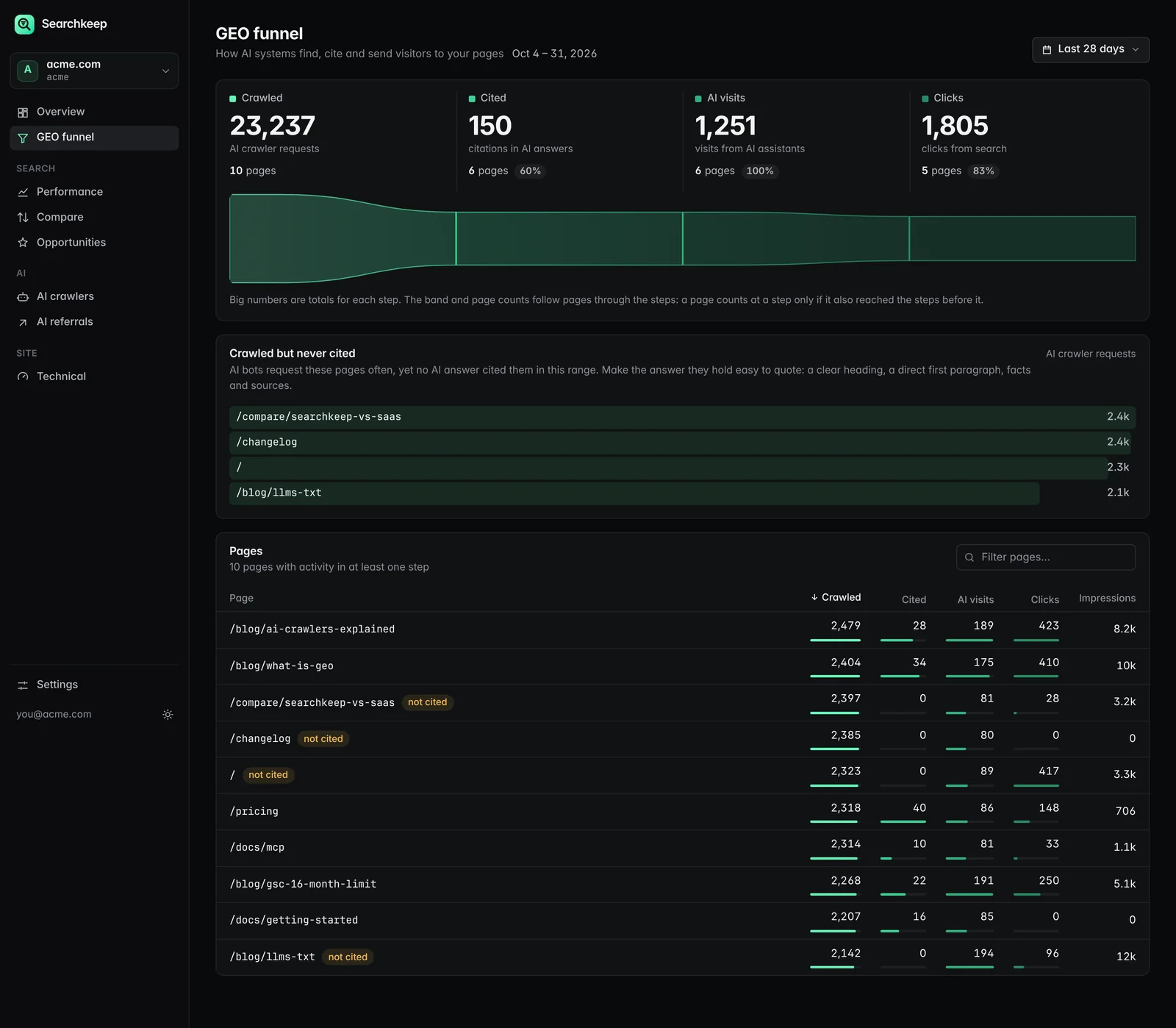
- The GEO funnel, per page. Crawled by AI (Cloudflare AI crawler requests) → cited by AI (imported from Bing AI Performance CSV exports) → clicked from AI (Web Analytics referrers from AI assistants), next to classic GSC and Bing clicks.
- History beyond 16 months. Year-over-year comparisons keep working long after Search Console drops the data.
- 12 read-only MCP tools (plus an opt-in sitemap submit), from general queries to opinionated finders: quick wins, cannibalization, CTR anomalies, content decay, AI crawler activity and more.
- A dashboard served by the same Worker: overview, GEO funnel, performance, period comparison, opportunities, AI crawlers and referrals, technical checks (Web Vitals, sitemaps, crawl issues, URL inspection) and a settings page with setup checks, sync runs and the AI citation import.
- Brand vs non-brand splits on every query-level view, driven by one regex.
What it does not do
Searchkeep only analyzes your own sites with data you already have access to. That is a deliberate boundary, written into the project charter:
- No backlinks. Backlink indexes require crawling the web at scale.
- No competitor data. There is no first-party source for someone else’s site.
- No rank tracking. Tracking positions means scraping search results, which Searchkeep will not do.
- No telemetry and no hosted service. There is nothing to sign up for and nothing that phones home.
Requirements
- A GitHub account, to fork the repository.
- A Cloudflare account with Workers and D1 (the free plan is enough for typical sites), a Zero Trust organization for Access (also available on a free plan), and a read-only API token.
- A custom domain or subdomain on Cloudflare for the Worker, such as
searchkeep.example.com. - At least one data source: a Search Console property, a Bing Webmaster Tools site, or a Cloudflare zone. Sources are independent; connect the ones you have.
Next steps
- Deploy Fork, connect Workers Builds, add Access and credentials. About 30–45 minutes.
- Connect an AI client Add your /mcp endpoint to Claude, Cursor or ChatGPT and browse the tools.
- Configuration Every secret, the SITES format, brand regex and write access.
- Architecture One Worker, three entrances, one core and one D1 database.
Prefer to read the source? Everything lives in the GitHub repository, including the agent-oriented AGENTS.md.